How To Join A HideTheWord Group
Groups in HideTheWord help you build consistency. When you memorize Scripture alongside others, you get accountability, encouragement, and the motivation to keep going even on days when you do not feel like it.
The Bible emphasizes the importance of community in our spiritual lives. Hebrews 10:24-25 encourages us to "consider how we may spur one another on toward love and good deeds, not giving up meeting together." HideTheWord Groups bring this biblical principle into your daily Scripture memory practice.
Joining a group is quick and simple. Here is how it works.
How It Works
Joining a group requires just 2 simple steps. You can be up and running in less than a minute.
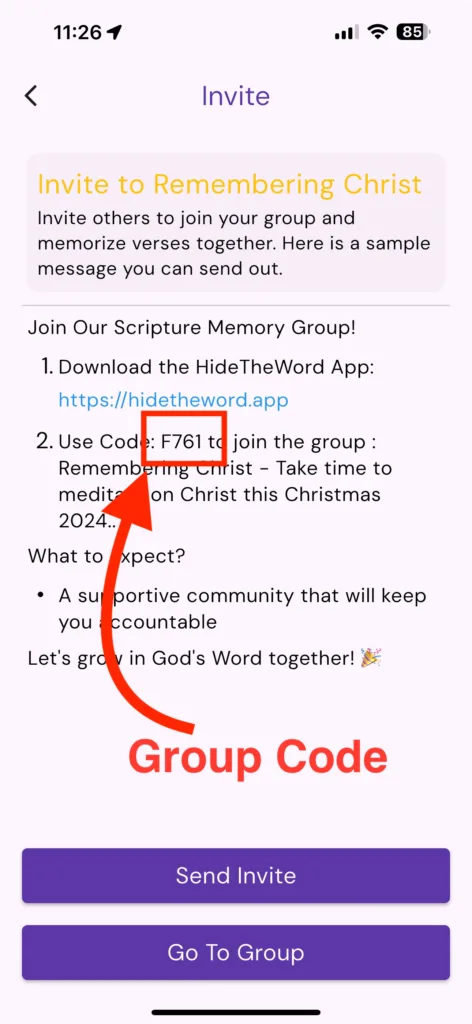
Step 1: Get a Group Code
Every HideTheWord Group has a unique 4-character code. The code is one letter followed by 3 numbers. For example, the 20 Verses in 2026 group uses code Z070.
Ask the person who created the group for their group code. If you are joining a public group, the code may be shared in a church bulletin, a social media post, or shared with you by a friend.
You can also create your own group and share your code with others. When you create a group, HideTheWord generates a unique code that you can send to friends, family, or your small group.
Step 2: Enter the Group Code
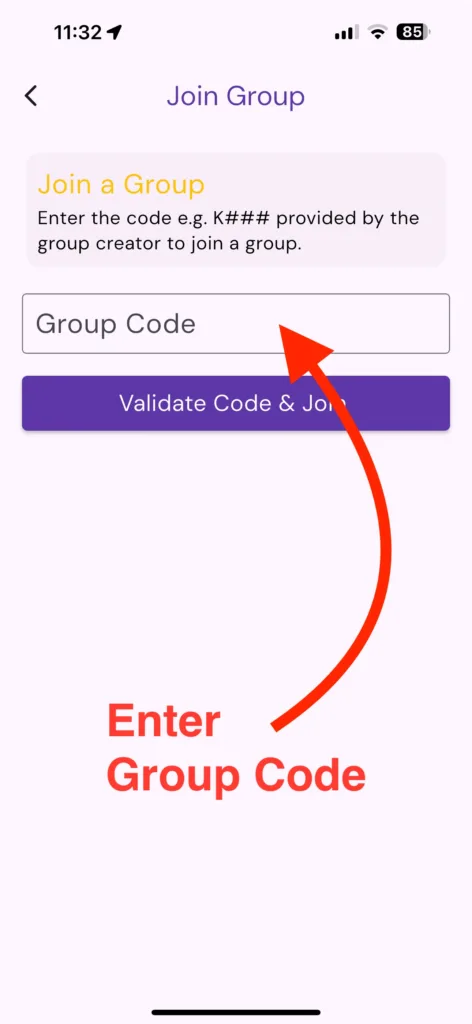
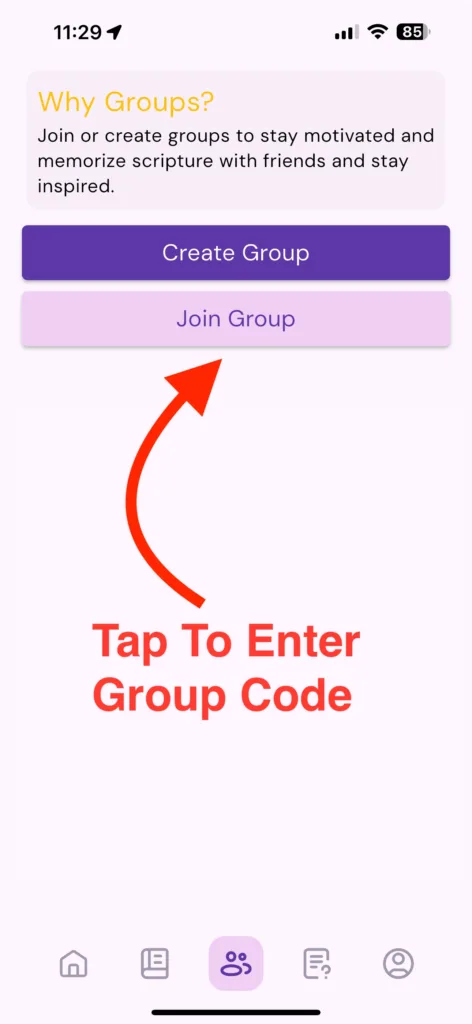
Open the HideTheWord app on your phone. Navigate to the Groups section from the main menu. You will see an option to "Join Group" or "Enter Group Code." Tap on it and type in the 4-character code.
That is it. You are now part of the group. You will immediately see the group's verse list, the progress of other members, and your first daily lesson waiting for you.
What Happens After You Join
Once you join a group, a few things happen:
You see the group's verses. The group leader may have added specific verses for everyone to work through together. These appear in your lesson plan automatically.
Verses unlock daily. Most groups use a daily unlock system. Each day, the next verse becomes available. This keeps the whole group moving at the same pace.
You can see everyone's progress. The group dashboard shows how each member is doing. You can see who has completed their lessons and who might need a gentle nudge.
You can send Nudges and Kudos. These two features are the heart of group interaction.
What You Can Do In Groups
Once you have joined, the real fun begins. Groups are designed to be interactive and encouraging.
Work through verses together. Everyone in the group works on the same verses at the same time. This creates a shared experience that you can talk about. You can discuss what a verse means to you, how it applies to your life, or what God is teaching you through it.
Send Nudges. A nudge is a gentle reminder to keep going. If you notice that a group member has not completed their lesson today, you can send them a nudge. It is a kind, encouraging push that says, "I am thinking of you. Keep going."
Send Kudos. When someone completes a lesson or finishes a verse, you can send them kudos. This is a celebration. It tells them, "I see your effort. I am proud of you. Keep it up."
These small interactions make a huge difference. Studies on habit formation show that positive social reinforcement is one of the most powerful tools for maintaining consistency. When you know someone will notice your effort, you are far more likely to make it.
Tips For Getting The Most Out Of Groups
Be active. Do not just join and stay silent. Send kudos when others make progress. Send gentle nudges when someone needs encouragement. The more you engage with your group, the more you will get out of it.
Invite others. If there is no group focused on the verses you want to memorize, create one and invite friends. Groups of 3 to 5 people seem to work best for accountability.
Be consistent. Your group members are counting on you. When you show up consistently, you encourage them to do the same.
Share insights. When a verse speaks to you, share it. Your insight might be exactly what another group member needs to hear.
Create Your Own Group
If you cannot find a group that fits your needs, you can create your own. Open the app, go to the Groups section, and select "Create Group." You will get a unique group code that you can share with anyone.
You can create a group for your church small group, your family, your friends from work, or even a group focused on a specific book of the Bible. The possibilities are endless.
The Power of Community Accountability
Scripture memory is a lifelong journey. It is not something you finish and check off your list. It is a discipline that grows deeper over time. Having a group of like-minded believers walking alongside you makes the journey richer, steadier, and more joyful.
Proverbs 27:17 says, "As iron sharpens iron, so one person sharpens another." HideTheWord Groups are designed to help you sharpen each other through shared Scripture memory.
Join a group today and experience the power of community accountability with HideTheWord.